Configuration
| Suitable Enviroment | SaaS |
| Private Deployment |
Requirements
| ONES |
|---|
| v3.6.0+ |
Overview
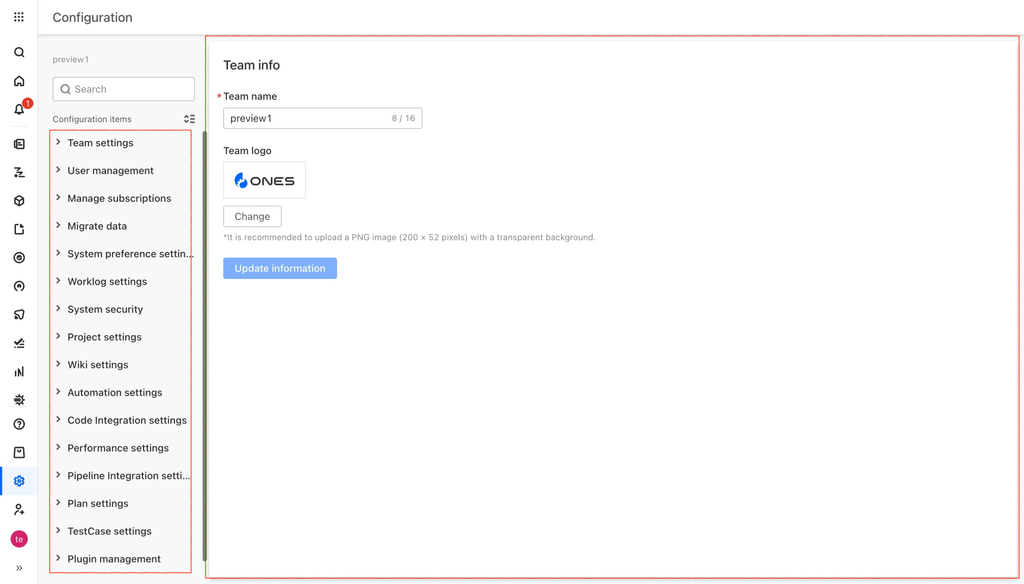
We have provided slots for "Configuration" to customize the page module for the application.
The slots currently supported are as follows:
- ones:settings:new
- ones:settings:team
- ones:settings:account
- ones:settings:import
- ones:settings:appearance
- ones:settings:manhour
- ones:settings:safe
- ones:settings:project
- ones:settings:wiki
- ones:settings:testcase
- ones:settings:pipeline_integration
- ones:settings:code_integration
- ones:settings:plan
- ones:settings:performance
- ones:settings:automation
- ones:settings:pipeline (deprecated)
Slots
ones:settings:new
Module path: Configuration / new module
Number limit: Declare a maximum of 10 slots in each plugin, and up to 100 slots in the system.
ones:settings:team
Module path: Configuration / Team settings
Number limit: Declare a maximum of 1 slots in each plugin, and up to 1 slots in the system.
ones:settings:account
Module path: Configuration / User management
Number limit: Declare a maximum of 1 slots in each plugin, and up to 1 slots in the system.
ones:settings:import
Module path: Configuration / Migrate data
Number limit: Declare a maximum of 1 slots in each plugin, and up to 1 slots in the system.
ones:settings:appearance
Module path: Configuration / System preference settings
Number limit: Declare a maximum of 1 slots in each plugin, and up to 1 slots in the system.
ones:settings:manhour
Module path: Configuration / Worklog settings
Number limit: Declare a maximum of 1 slots in each plugin, and up to 1 slots in the system.
ones:settings:safe
Module path: Configuration / System security
Number limit: Declare a maximum of 1 slots in each plugin, and up to 1 slots in the system.
ones:settings:project
Module path: Configuration / Project settings
Number limit: Declare a maximum of 1 slots in each plugin, and up to 1 slots in the system.
ones:settings:wiki
Module path: Configuration / Wiki settings
Number limit: Declare a maximum of 1 slots in each plugin, and up to 1 slots in the system.
ones:settings:testcase
Module path: Configuration / TestCase settings
Number limit: Declare a maximum of 1 slots in each plugin, and up to 1 slots in the system.
ones:settings:pipeline_integration
ONES Requirement: v3.14.0+
Module path: Configuration / Pipeline Integration settings
Number limit: Declare a maximum of 1 slots in each plugin, and up to 1 slots in the system.
ones:settings:code_integration
ONES Requirement: v3.14.0+
Module path: Configuration / Code Integration settings
Number limit: Declare a maximum of 1 slots in each plugin, and up to 1 slots in the system.
ones:settings:plan
Module path: Configuration / Plan settings
Number limit: Declare a maximum of 1 slots in each plugin, and up to 1 slots in the system.
ones:settings:performance
Module path: Configuration / Performance settings
Number limit: Declare a maximum of 1 slots in each plugin, and up to 1 slots in the system.
ones:settings:automation
Module path: Configuration / Automation settings
Number limit: Declare a maximum of 1 slots in each plugin, and up to 1 slots in the system.
ones:settings:pipeline (deprecated)
Module path: Configuration / Pipeline settings
Number limit: Declare a maximum of 1 slots in each plugin, and up to 1 slots in the system.
Usage
modules:
  - id: ones-settings-team-MSmf
    title: Team settings
    moduleType: ones:settings:team
    modules:
      - id: ones-settings-team-wd2A
        title: Team info
        modules:
          - id: ones-settings-team-MWB6
            title: Team info
            entry: >-
              modules/ones-settings-team-MSmf/ones-settings-team-wd2A/ones-settings-team-MWB6/index.html
Supported config options:
Slot hierarchy
In the Configuration page, every config consists of three levels. The figure below is the hierarchical structure of "TestCase Settings".
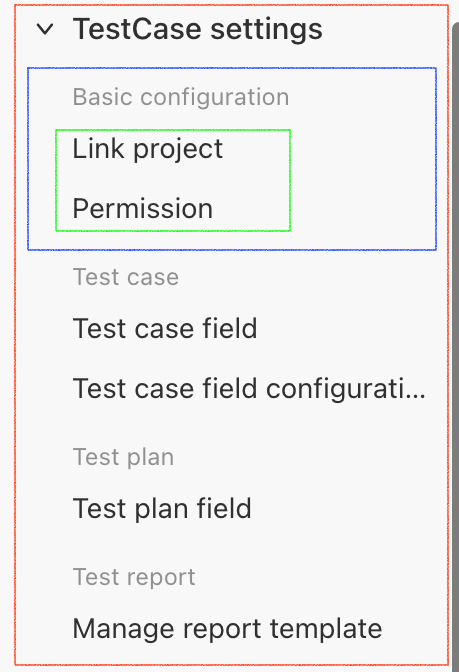
Part of the configuration doesn't show the second level, for example, the "TestCase settings". But the slot will add a default group in the second level. You can replace the default group(ones:settings:team:default), or append a new group in the second level(ones:settings:team:new).