@ones-op/bridge

We provide a set of tool libraries that can help you call some methods provided in the ONES system
Installation
Install the package in the plugin /web directory using the following command:
- npm
- Yarn
- pnpm
npm install @ones-op/bridge
yarn add @ones-op/bridge
pnpm add @ones-op/bridge
Usage
import { modal } from '@ones-op/bridge'

modal.newCreateTask()
This example applies to ONES v6.88.0 and later. For earlier hosts, use the original creation methods listed below.
APIs
modal
Through the method exported by modal, you can open a series of pop-up dialog in the ONES system
newCreateTask
Open the current task creation dialog by sending the NewCreateTask event. This method also replaces createSubTask.
Requirements
Requires ONES v6.88.0 or later and a release of @ones-op/bridge with an @ones-op/rc-peta dependency that exports modal.newCreateTask. Older hosts do not support this event; upgrading the SDK alone does not add host support.
Params
| Params | Description | Type | Required | Default |
|---|---|---|---|---|
| modalProps | Dialog configuration | NewCreateTaskModalProps | N | {} |
| Property | Behavior |
|---|---|
projectUUID, issueTypeUUID | Initial project and issue type; take priority over the corresponding field values. |
projectCondition, issueTypeCondition | Restrict selectable projects or issue types, for example with uuid_in. |
defaultValues | Field UUID/value pairs. Fields absent from the form are not submitted. |
contextValues | Field UUID/value pairs that are submitted even when absent from the form. For the same field, defaultValues takes priority. Both override form-configured defaults. |
canImportTasks, canCreateTheNext | Show the import action or the option to create another task. |
disableToastWhenSuccess | Suppress the creation success message. |
onTaskCreated | Called after each successful creation with a task summary and a boolean indicating whether to create another task. |
onCancel | Called when the dialog closes, including after successful creation when not creating another task. |
onFormFinish | Takes over after validation. When provided, the host does not create tasks or call onRequestCreate, and closes the dialog. |
onRequestCreate | Takes over the creation request. Return response to run the host's result handling; without response, submitControl controls field-control submission, followed by continuing or closing the dialog. |
Types
These types can be imported from @ones-op/bridge. CreatedTask is a task summary, not the full task detail. Field value formats depend on the target field's configuration.
import type { ReactNode } from 'react'

interface TaskFieldValue {
  field_uuid: string
  original_value_handling?: 'modify_original' | 'append_original'
  value?: any
  append?: any
  update?: any
  delete?: any
}

interface CreatedTask {
  uuid: string
  number: string
  issue_type_uuid: string
  issue_type_name: string
  project_uuid: string
  parent_uuid: string
  display_id: string
  summary: string
  project_identifier: string
}

interface CreateTaskParams {
  uuid: string
  project_uuid: string
  issue_type_uuid: string
  field_values: TaskFieldValue[]
  recommend_field_values?: TaskFieldValue[]
  position_mode?: 'before' | 'after'
  anchor_item_uuid?: string
  upstream_item_uuid?: string
  upstream_field_uuid?: string
}

interface CreateTasksResult {
  async_compute_token: string
  bad_tasks: any[]
  tasks: CreatedTask[]
}

interface NewCreateTaskModalProps {
  title?: string
  taskUUID?: string
  projectUUID?: string
  issueTypeUUID?: string
  projectCondition?: Record<string, any>
  issueTypeCondition?: Record<string, any>
  defaultValues?: TaskFieldValue[]
  contextValues?: TaskFieldValue[]
  canImportTasks?: boolean
  canCreateTheNext?: boolean
  disableToastWhenSuccess?: boolean
  okText?: ReactNode
  cancelText?: ReactNode
  extraHeader?: ReactNode
  onProjectUUIDChange?: (projectUUID?: string) => void
  onIssueTypeUUIDChange?: (issueTypeUUID?: string) => void
  onCancel?: () => void
  onTaskCreated?: (task: CreatedTask, createTheNext: boolean) => void
  onFormFinish?: (createTask: CreateTaskParams, formValues: Record<string, any>) => void
  onRequestCreate?: (
    tasks: CreateTaskParams[],
  ) => Promise<{ submitControl: boolean; response?: CreateTasksResult }>
}
Example
import { modal } from '@ones-op/bridge'

modal.newCreateTask({
  projectUUID: 'projectUUID',
  issueTypeUUID: 'issueTypeUUID',
  defaultValues: [{ field_uuid: 'field001', value: 'Example task' }],
  canCreateTheNext: true,
  onTaskCreated(task, createTheNext) {
    console.log(task.uuid, createTheNext)
  },
})
Create a child task
Use the upstream field on the new child task in contextValues. Resolve its UUID and the allowed child issue types from the hierarchy configuration. Do not use the parent's downstream field or assume that the legacy parent_uuid field represents the configured hierarchy. The following example uses a hierarchy field whose value is an array of task UUIDs:
modal.newCreateTask({
  projectUUID: 'parentProjectUUID',
  issueTypeCondition: { uuid_in: ['childIssueTypeUUID'] },
  contextValues: [{ field_uuid: 'upstreamFieldUUID', value: ['parentTaskUUID'] }],
})
newCreateRelatedTask
Open the current related-task creation dialog by sending the NewCreateRelatedTask event. It requires ONES v6.88.0 or later and an SDK release exposing this method, as described for newCreateTask.
Params
| Params | Description | Type | Required | Default |
|---|---|---|---|---|
| modalProps | Dialog configuration, including the source task | NewCreateRelatedTaskModalProps | Y |
sourceTask.uuid, sourceTask.issueTypeUUID, and sourceTask.projectUUID are required. The SDK throws before dispatch if any is missing. The top-level projectUUID selects the new task's project; sourceTask.projectUUID identifies the source task's project.
defaultRelationUUID sets the initial relation, disabled prevents changing the relation, and closeable shows a switch to turn off linking to the source task. The relation selector can constrain the available issue types and set the corresponding relation field values.
The second argument of onTaskCreated is the currently selected relation UUID, not the createTheNext boolean. It is not a separate relation-success result. If closeable is enabled, this value alone does not prove that the source-task link was created.
Type
interface NewCreateRelatedTaskModalProps extends Omit<NewCreateTaskModalProps, 'onTaskCreated'> {
  disabled?: boolean
  defaultRelationUUID?: string
  sourceTask: {
    uuid: string
    issueTypeUUID: string
    projectUUID: string
  }
  closeable?: boolean
  onTaskCreated?: (task: CreatedTask, relationUUID?: string) => void
}
Example
modal.newCreateRelatedTask({
  sourceTask: {
    uuid: 'sourceTaskUUID',
    issueTypeUUID: 'sourceIssueTypeUUID',
    projectUUID: 'sourceProjectUUID',
  },
  projectUUID: 'targetProjectUUID',
  defaultRelationUUID: 'relationUUID',
  onTaskCreated(task, relationUUID) {
    console.log(task.uuid, relationUUID)
  },
})
Choose the creation API by ONES version
| ONES version | Supported creation methods and events |
|---|---|
Earlier than v6.88.0 | createTask / CreateTask, createSubTask / CreateSubTask, createRelatedTask / CreateRelatedTask |
v6.88.0 and later | newCreateTask / NewCreateTask, newCreateRelatedTask / NewCreateRelatedTask |
The original three events remain applicable to ONES versions earlier than v6.88.0. They are deprecated starting with ONES v6.88.0, where the host only displays a warning and no longer opens their creation dialogs. The SDK retains those methods and states this version boundary in their deprecation annotations. Choose the API for the target host version; the SDK does not detect that version or automatically translate parameters.
When migrating an integration to ONES v6.88.0 or later, update the parameters as follows:
| Previous API or parameter | Replacement |
|---|---|
createTask / CreateTask | newCreateTask / NewCreateTask |
createSubTask / CreateSubTask, parentTask | newCreateTask with the child's upstream hierarchy field in contextValues and the allowed child issue types in issueTypeCondition |
createRelatedTask / CreateRelatedTask, relatedTask | newCreateRelatedTask / NewCreateRelatedTask, with sourceTask: { uuid, issueTypeUUID, projectUUID } |
defaultValue.projectUUID, defaultValue.issueTypeUUID | Top-level projectUUID, issueTypeUUID |
Other defaultValue entries | defaultValues or contextValues with the actual field UUIDs and their supported value formats |
defaultValue.relatedTypeValue | Select a current relation UUID and pass it as defaultRelationUUID |
disabledFields | No equivalent generic field-disable option. Use projectCondition / issueTypeCondition to restrict candidate ranges where appropriate. |
onOk(result) | For newCreateTask, use onTaskCreated(task, createTheNext) and check !createTheNext if only the final creation matters. The callback no longer returns queryToTask. |
onRelatedSuccess | Use newCreateRelatedTask.onTaskCreated(task, relationUUID); its arguments follow the new contract. |
extra | Pass only supported properties directly in the new configuration. |
The APIs below apply to ONES versions earlier than v6.88.0.
createTask
Applies to ONES versions earlier than v6.88.0. Deprecated starting with v6.88.0: use newCreateTask and update the parameters for those hosts.
open the pop-up dialog to create a task
Requirements
| ONES | @ones-op/bridge |
|---|---|
>= v3.13.14, < v6.88.0 | v0.2.0 |
Params
| Params | Description | Type | Required | Default |
|---|---|---|---|---|
| modalProps | the config of the modal | CreateTaskModalProps | N | {} |
Type
interface TaskCreatedResult {
  /** ID of the created task */
  taskUUID: string
  /** method to go to the task detail page */
  queryToTask: () => void
  /** the detail info of the created task */
  task: Record<string, any>
}

interface CreateTaskModalProps {
  /** the title of the dialog */
  title?: string
  /** the default value of the form */
  defaultValue?: {
    /** the title of the task */
    summary?: string
    /** the project of the task */
    projectUUID?: string
    /** the issue type of the task */
    issueTypeUUID?: string
    /** the user id whom assigned by the task */
    assign?: string
    /** the description of the task */
    descRich?: string
    /** the sprint of the task */
    sprintUUID?: string
  }
  /** the disabled fields of the form */
  disabledFields?: {
    /** the title of the task */
    summary?: boolean
    /** the project of the task */
    projectUUID?: boolean
    /** the issue type of the task */
    issueTypeUUID?: boolean
    /** the user id whom assigned by the task */
    assign?: boolean
    /** the description of the task */
    descRich?: boolean
    /** the sprint of the task */
    sprintUUID?: boolean
  }
  /** the callback when the user clicks confirm button and does not continue to create the next task */
  onOk?: (result: TaskCreatedResult) => void
  /** the callback when the cancel button is clicked */
  onCancel?: () => void
  /** the callback after the task is created */
  onTaskCreated?: (task: TaskCreatedResult['task']) => void
  /** extra properties */
  extra?: Record<string, any>
}
createSubTask
Applies to ONES versions earlier than v6.88.0. Deprecated starting with v6.88.0: use newCreateTask and update the parameters for those hosts.
open the pop-up dialog to create a sub task
Requirements
| ONES | @ones-op/bridge |
|---|---|
>= v3.13.14, < v6.88.0 | v0.2.0 |
Params
| Params | Description | Type | Required | Default |
|---|---|---|---|---|
| modalProps | the config of the modal | CreateSubTaskModalProps | Y |
Type
interface CreateSubTaskModalProps extends CreateTaskModalProps {
  /** the detail of the parent task */
  parentTask: {
    /** the id of the parent task */
    uuid: string
    /** the project of the parent task */
    project_uuid: string
    [key: string]: any
  }
}
uuid and project_uuid must be included in parentTask, otherwise the sub task may not be created successfully. You can directly pass in the data returned by [the task detail interface] (../../../api/project/task/task.md#get work item details)
createRelatedTask
Applies to ONES versions earlier than v6.88.0. Deprecated starting with v6.88.0: use newCreateRelatedTask and update the parameters for those hosts.
open the pop-up dialog to create a related task
Requirements
| ONES | @ones-op/bridge |
|---|---|
>= v3.13.14, < v6.88.0 | v0.2.0 |
Params
| Params | Description | Type | Required | Default |
|---|---|---|---|---|
| modalProps | the config of the modal | CreateRelatedTaskModalProps | Y |
Type
interface CreateRelatedTaskModalProps extends Omit<CreateTaskModalProps, 'defaultValue'> {
  defaultValue?: CreateTaskModalProps['defaultValue'] & {
    /** the related type */
    relatedTypeValue?: string
  }
  /** the task to relate */
  relatedTask: {
    /** the id of the related task */
    uuid: string
    /** the issue type of the related task */
    issue_type_uuid: string
    [key: string]: any
  }
  /** the callback whe the task is related */
  onRelatedSuccess?: (data: Record<string, any>) => void
}
uuid and issue_type_uuid must be included in relatedTask, otherwise the task relation may fail. You can directly pass in the data returned by [task detail interface] (../../../api/project/task/task.md#get work item details)
refreshList
you can mannually trigger the refresh of some lists in the ONES system
Requirements
| ONES | @ones-op/bridge |
|---|---|
v3.13.24+ | v0.3.0+ |
Params
| Params | Description | Type | Required | Default |
|---|---|---|---|---|
| listName | the name of the list | ListName | Y |
Type
type ListName =
  | 'memberList'
  | 'codeRepositoryList'
  | 'planTestcaseList'
  | 'testPlanList'
  | 'requirementTraceabilityList'
  | 'testPlanList'
memberList
- ONES requirements:
v3.11.15+
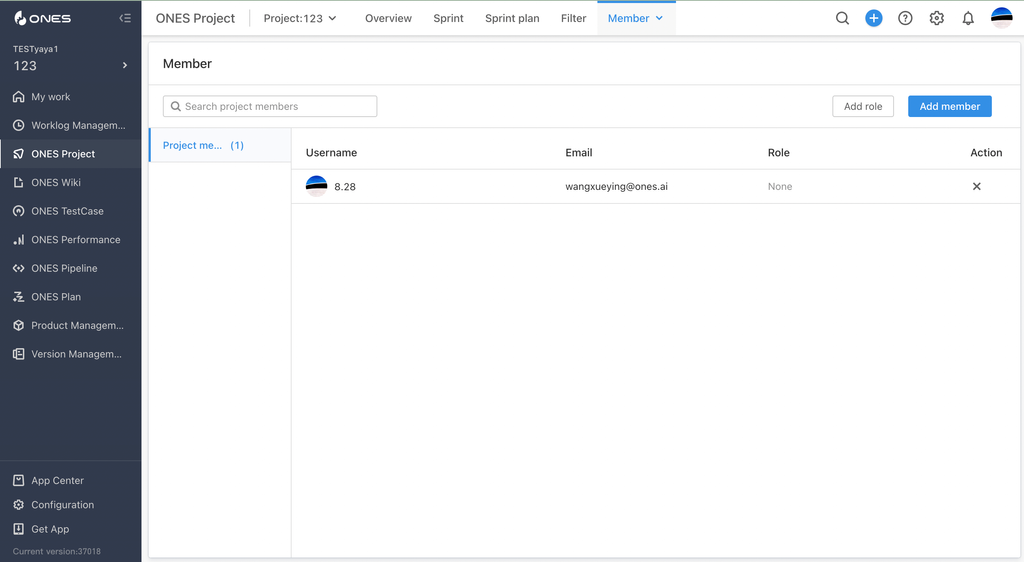
Triggered member list refresh (supports all member lists).
codeRepositoryList
- ONES requirements:
v3.13.9+
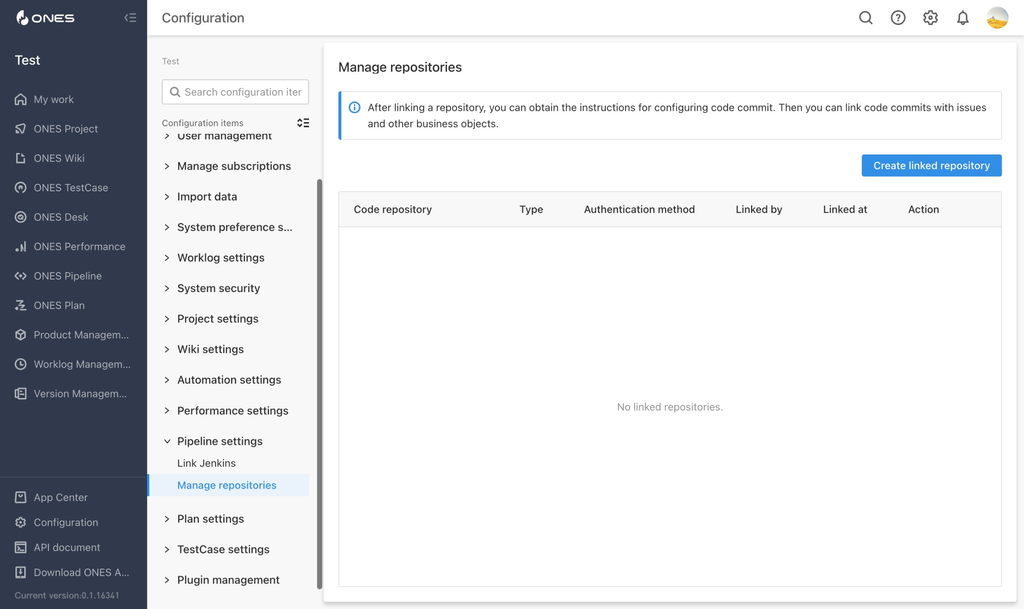
Refresh the code repositories list in the "Configuration" - "Pipeline settings" - "Manage repositories" page
planTestcaseList
- ONES requirements:
v3.13.24+
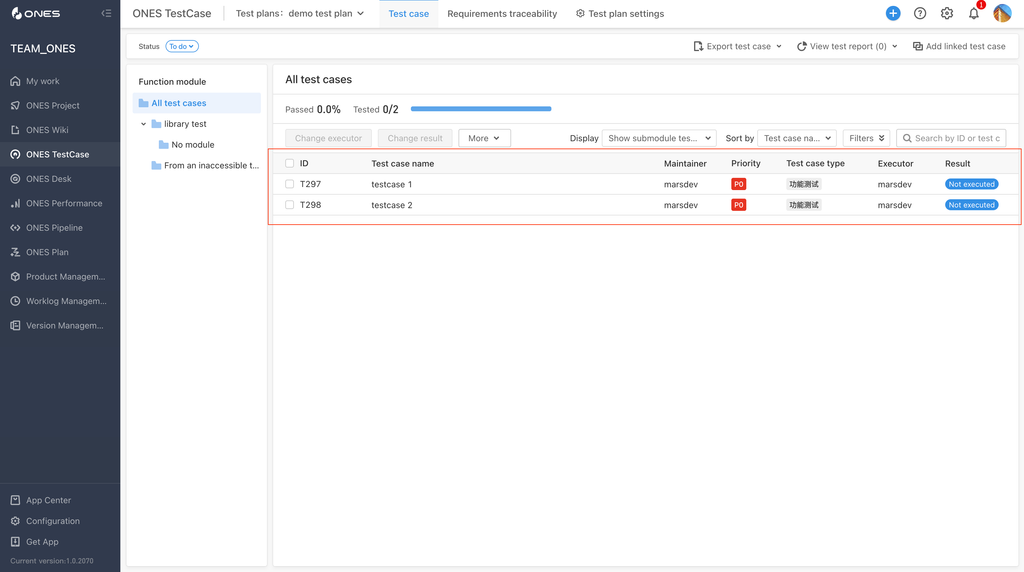
Refresh the testcase list in the "ONES TestCase" - "Test Plans" - "Test case" page
testPlanList
- Requirements:
v0.3.1+ - ONES requirements:
v3.13.35+
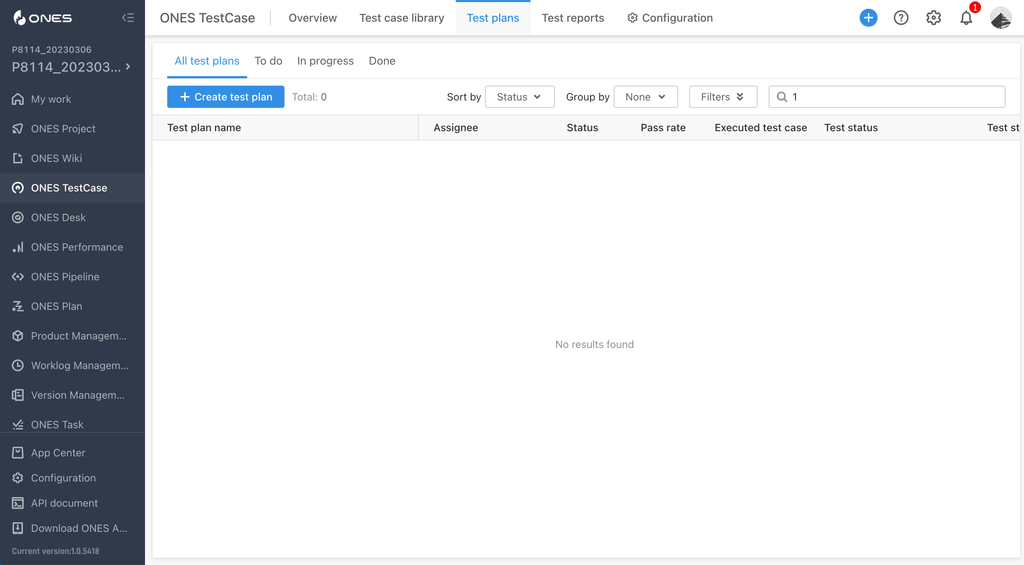
Refresh the testcase list in the "ONES TestCase" - "Test Plans" page
requirementTraceabilityList
- ONES requirements:
v3.13.24+
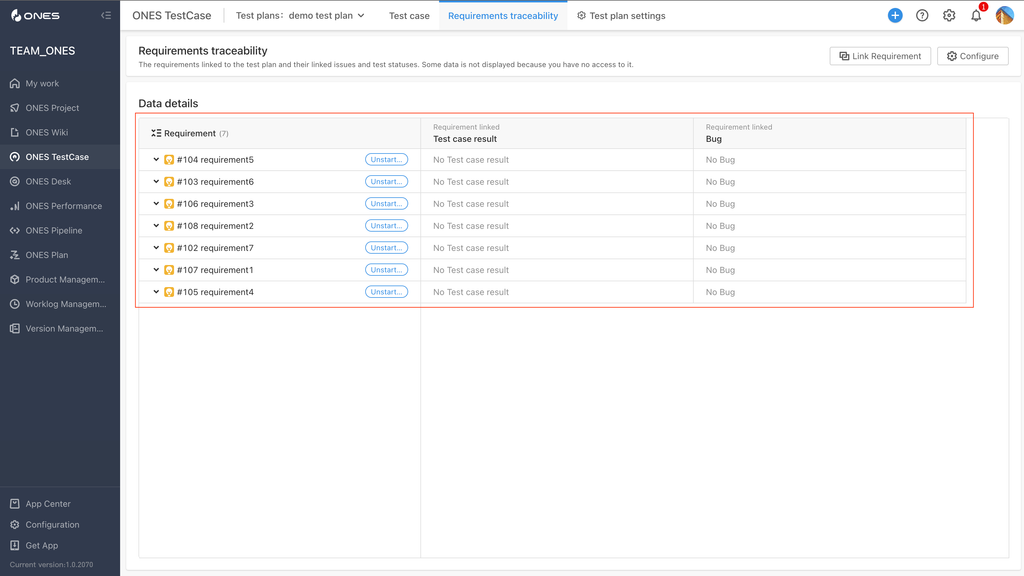
Refresh the requirement traceability list in the "ONES TestCase" - "Test Plans" - "Requirements traceability" page
invokeProgressManager
Requirements
| ONES | @ones-op/bridge |
|---|---|
v3.13.24+ | v0.3.0+ |
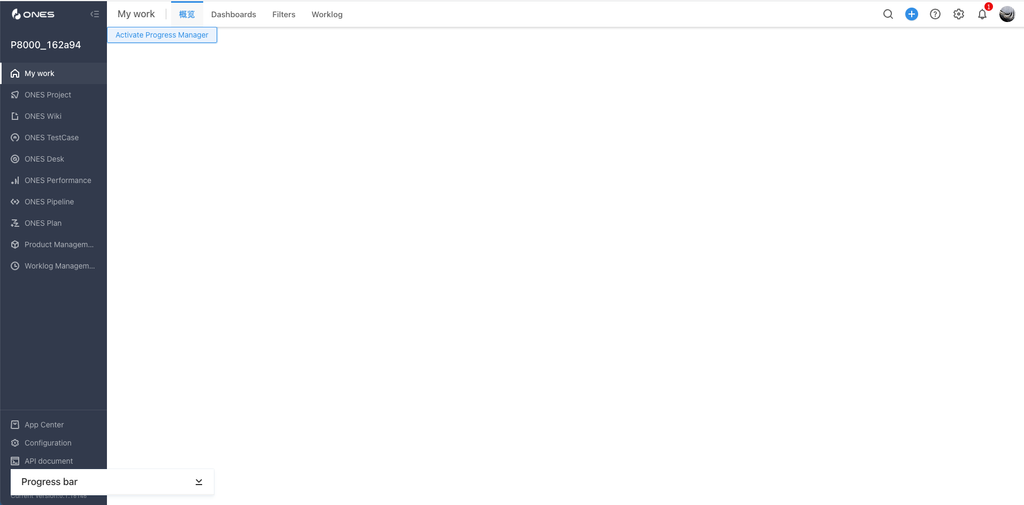
you can invoke the global progress manager by calling the invokeProgressManager method
lifecycle
The plugin can manipulate part of its own lifecycle by calling the methods of the lifecycle instance.
Requirements
| @ones-op/bridge |
|---|
v0.9.0+ |
destroy
The plugin can destroy themselves by calling the lifecycle.destroy method.
This is usually used in manually activated plugin modules, and if the slot you are using does not specify it, you generally do not need to call this method.
- ONES requirements:
v3.11.40+
onDestroy
Called immediately before ONES destroys the plugin.
Requirements
| ONES | @ones-op/bridge |
|---|---|
v3.13.58+ | v0.6.1+ |
Params
| Params | Description | Type | Required | Default |
|---|---|---|---|---|
| callback | the callback function when the ONES try to destroy the plugin | CallbackFn | Y |
Types
function onDestroy(callback: () => void): void
dashboardCard
Through the hook provided by the dashboardCard module,you can complete the related functionality of custom card
this module is only available in the plugin module of custom card
Requirements
| ONES | @ones-op/bridge |
|---|---|
v3.13.50+ | v0.6.0+ |
useOnSubmitConfig
call the useOnSubmitConfig method in the card configuration pop-up window (scene is setting), your callback will be triggered when the user clicks the save configuration button.
Params
| Params | Description | Type | Required | Default |
|---|---|---|---|---|
| callback | the callback function when the user clicks the submit button | CallbackFn | Y |
Types
type CallbackFn = <T = any>(submit: (config: T) => void) => void | Promise<void>

function useOnSubmitConfig<T>(callback: CallbackFn<T>): void
useCustomMenus
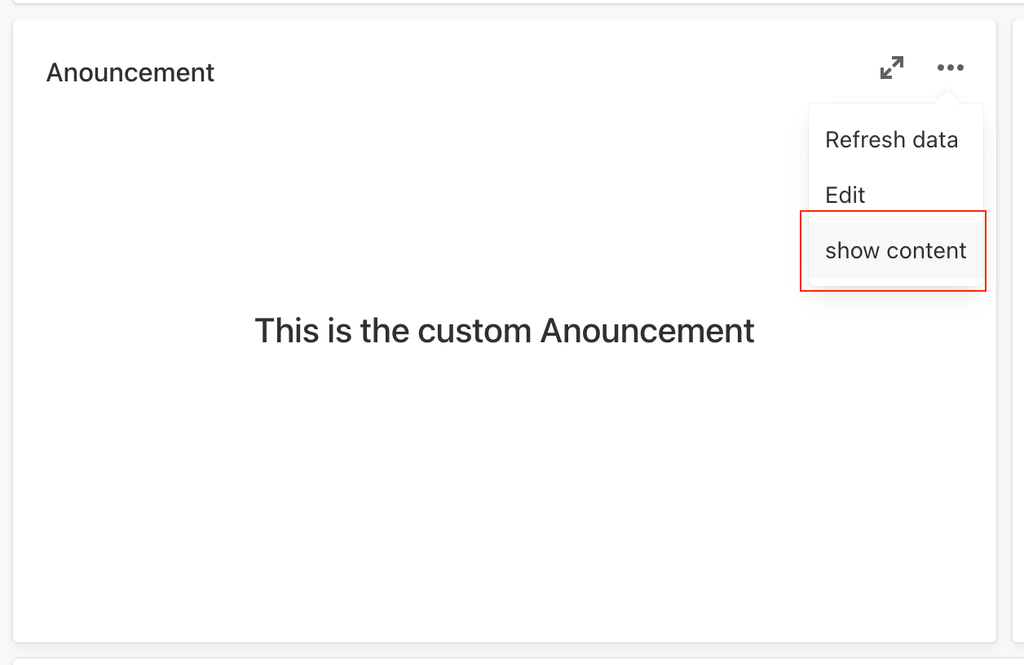
call the useCustomMenus method in the card rendering area (scene is render), you can mount custom menus of the card
Params
| Params | Description | Type | Required | Default |
|---|---|---|---|---|
| customMenus | custom menus | CustomMenuItem[] | Y |
Types
type CustomMenuItem = {
  key: string; // the unique key of the menu item
  label: string; // the title of the menu item
  onClick: () => void | Promise<void>; // the callback when the menu item is clicked
};

function useCustomMenus(customMenus: CustomMenuItem[]): void;
OPProvider
The OPProvider will unmount its children component when the plugin calls the function lifecycle.destroy. It's useful when the plugin wants to delay destroying the component by config enableDelayDestroy to true in the YAML.
Requirements
| ONES | @ones-op/bridge |
|---|---|
v3.13.58+ | v0.6.1+ |